At MindWeal, we primarily order labs through Quest Diagnostics, which is fully integrated with our EMR. Lab orders are sent directly to Quest and automatically available in their system—patients do not need a paper copy. They can visit any Quest location, and their order will be on file. Results are sent directly to our EHR, ensuring seamless access.
While LabCorp is an option, it is discouraged because results are not sent directly to our EMR. Providers must create an account with the LabCorp portal to order labs and manually retrieve results.
Additionally, some patients may prefer to have their labs done by their pediatrician or a specific hospital. In such cases, we can provide a paper prescription for them to take to their preferred provider. However, it is important to inform them that MindWeal will not receive results automatically—they will be responsible for obtaining the lab report and providing it to us.
Ordering Labs via Quest Diagnostics
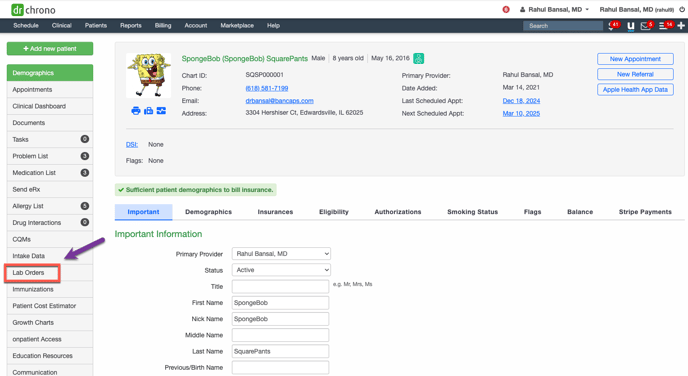
- Go to the patient's chart in DrChrono. Click "Lab Orders" in the left navigation menu. This will bring up the Lab Order page, where you can view past orders.
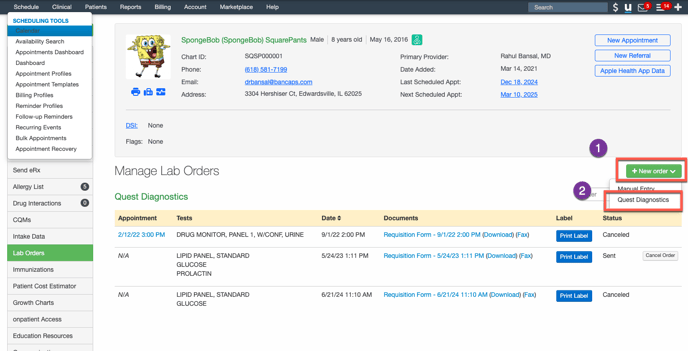
- Click "New Order" and select Quest Diagnostics from the dropdown. This will bring up the Lab Order Screen.
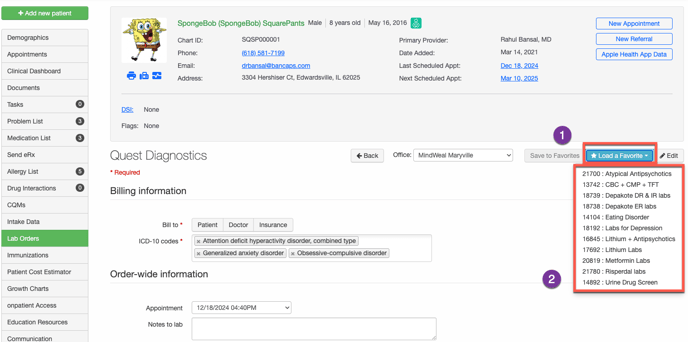
- Click "Load a Favorite" to access MindWeal Lab Order Sets. Select the appropriate order set from the dropdown (e.g., Eating Disorder Lab Order Set in this example).
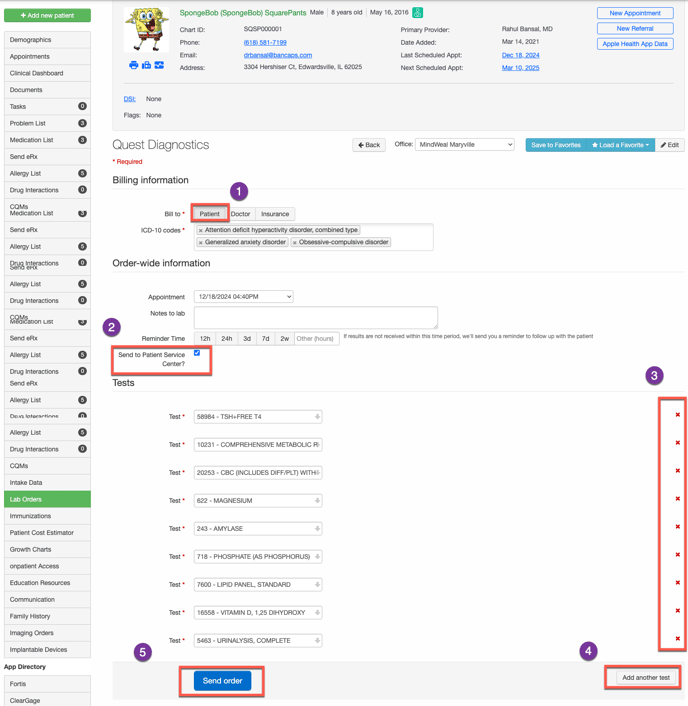
- Customize the Order
- Billing: Always select "Bill to Patient."
- Service Location: Always select "Send to Patient Service Center."
- Remove any unnecessary labs.
- Add additional tests as needed.
- Click "Send Order" to complete the process.
Ordering Labs via LabCorp
While LabCorp is an option, it is highly discouraged because results are not sent directly to our EMR. Providers must create an account with the LabCorp portal to order labs and manually retrieve results. Ask Dr. Bansal to create a provider account for you in Labcorp portal.
Create Patient Account in LabCorp Portal
Providers will create a task for VMA (Catlea) to create a patient account in LabCorp portal.
Click HERE to learn how to create a patient account in LabCorp.
Order Labs in LabCorp Portal
Provider will order labs after patient account is created in LabCorp portal. Click HERE to learn how to order labs in LabCorp portal