Step 1: Search for the Medication
-
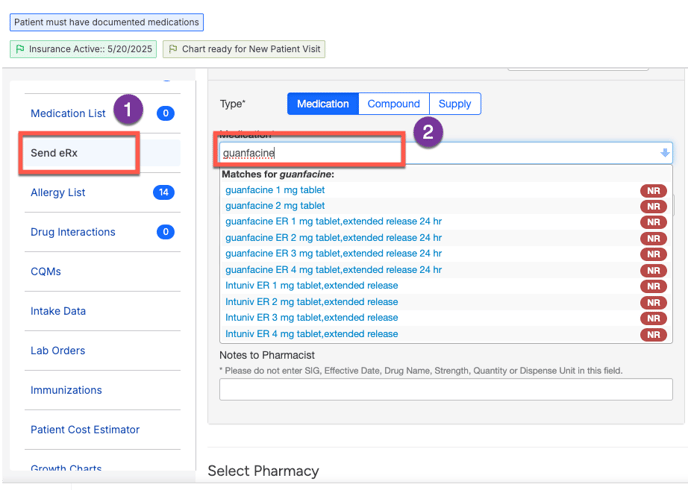
Go to SendRx in left navigation menu of patient's chart
-
In the search bar, enter the name of the intended medication.
- From the dropdown, select the correct medication.
Step 2: Select the Medication
-
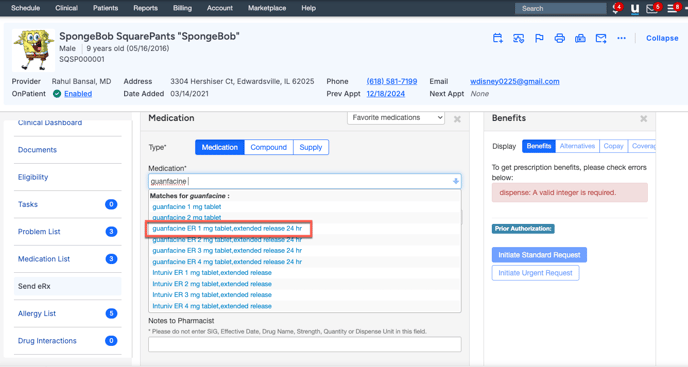
Choose the correct medication from the dropdown list.
Important: You must select a medication from the dropdown. If the medication is not listed, it cannot be ordered.
Step 3: Create Medication Order
-
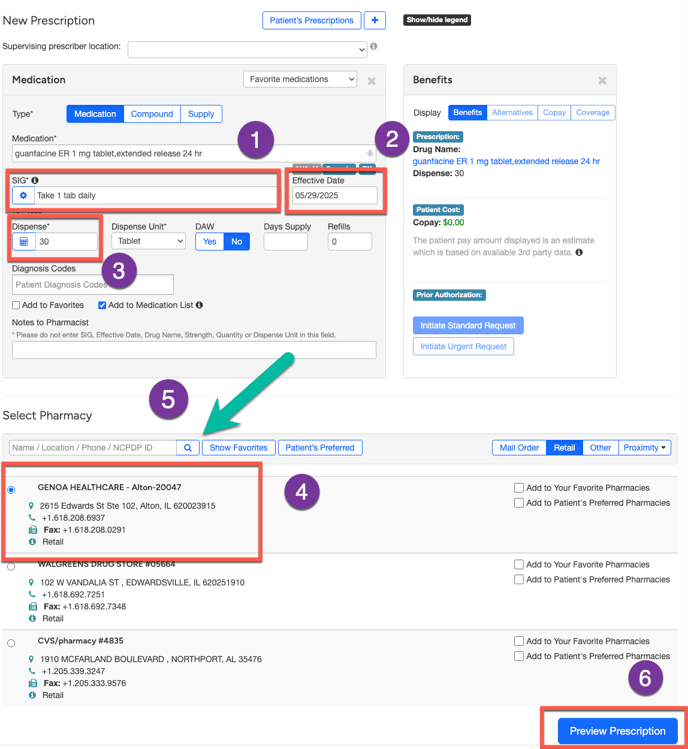
SIG (Instructions):
-
Enter detailed instructions on how the patient should take the medication.
-
-
Effective Date:
-
Select the start date for the medication.
-
-
Dispense Quantity:
-
Enter the total amount to be dispensed.
-
-
Pharmacy Selection:
-
Choose the patient’s preferred pharmacy from the list.
-
If the pharmacy is not listed, search by ZIP code to find it.
-
-
Preview the Prescription:
-
Click Preview Prescription to review before sending.
-
If the Medication is to be Compounded:
-
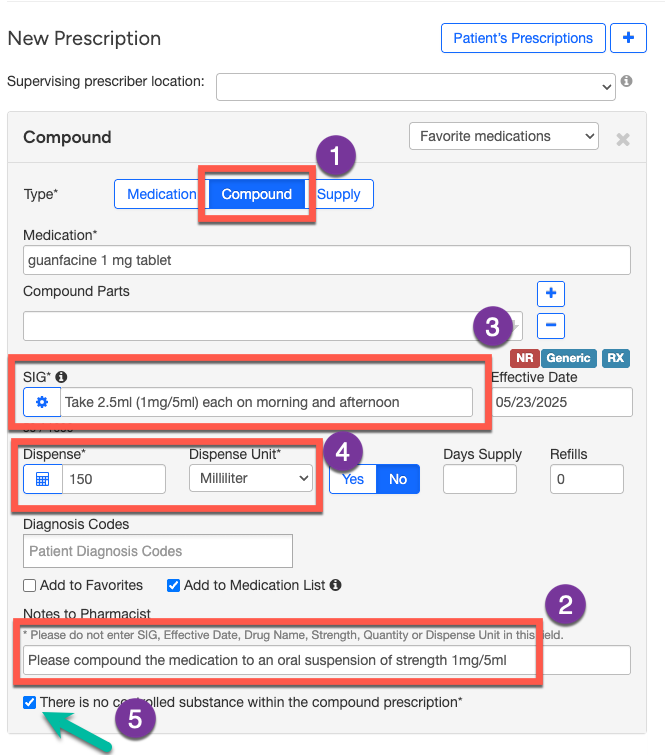
Change Type:
-
Change the type from “Medication” to “Compound.”
-
-
Note to Pharmacist:
-
In the Note to Pharmacist section, write:“Please compound the medication to an oral suspension of strength [insert strength for eg., 1 mg/ 5ml].”
-
-
SIG (Instructions):
-
Include the exact dosage and strength. Example:
“Take 2.5 mL (1 mg / 5 mL) each morning and afternoon.”
-
This helps ensure clarity for both patient and pharmacist
-
Typical Strengths:
-
Guanfacine: 1 mg / 5 mL
-
Clonidine: 0.1 mg / 1 mL
-
Dispense Amount:
-
Calculate based on daily dose × number of days.
Example: For 5 mL per day for 30 days → 150 mL
-
-
Controlled Substance Checkbox:
-
Check the box confirming that the compound does not contain a controlled substance.
-
Step 4: Send Medication Order
-
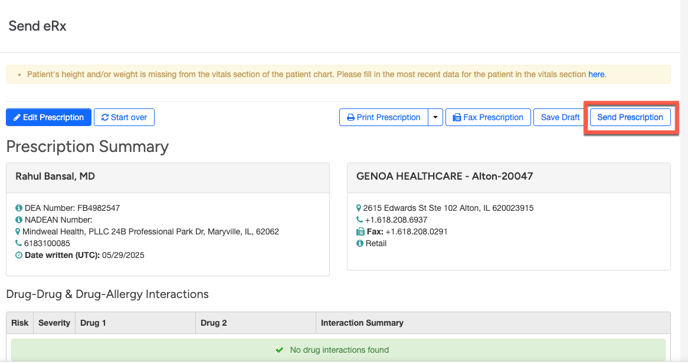
On the next screen, review all details.
-
Click Send to finalize the order.
-
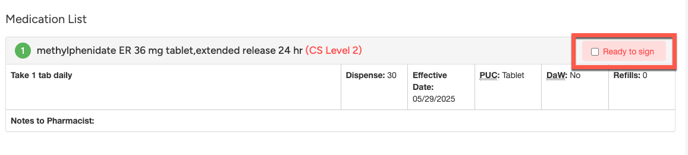
For Controlled Substances:
-
You must first click “Ready to Sign” before sending.
-
THINGS TO REMEMBER
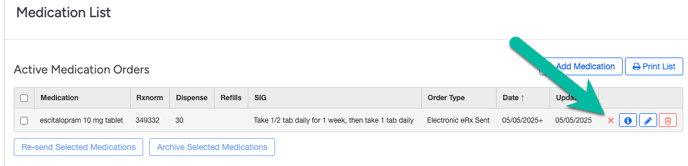
- If a medication is no longer active or has been discontinued, be sure to click the red “X” button to discontinue it. Do not archive the medication or put it in Trash.
- Update the active medication list if med changes have been made without a clinical visit (via secure chat, email etc.)
- Create your favorite med list for meds that you prescribe most frequently.
- As much as possible use generic names of the medications in prescription (also in notes)
- If a coupon will be used, put the note for the pharmacist in the notes section. A note will read something like this “No PA needed. Patient will use a savings card for this prescription. Run the prescription using insurance and then add the coupon on top of it to make it work. Please do not send a request for PA”.
- For stimulant medications, the quantity needs to be spelled out in the notes section of the prescription. For eg, thirty tabs
- No refills can be written for controlled substances and they can be prescribed for only one month in one particular prescription.
- While Cross titrating one medication to another, put in the notes section of both meds that you are cross titrating and the patient will be on both meds for 1 month. For example, say cross titrating Citalopram to venlafaxine. Will take both for one month.
- If prescribing a medication dose that needs to be sent in 2 prescriptions, write the total dose in notes. For example, if prescribing Fluoxetine 30 mg, separate prescriptions for 20mg and 10mg need to be sent as fluoxetine is not available in 30mg. In the notes section of each prescription write 30mg
- Do not prescribe medication after a clinical visit if the patient has more than a one-month supply remaining. In other words, if the refill due date is more than a month away, a new prescription should not be prescribed.